 pedro-bento
719946b3cd
Reviewed-on: #3
Co-authored-by: pedro-bento <mail@pbento.pt>
Co-committed-by: pedro-bento <mail@pbento.pt>
6.1 KiB
Clipwright
Self-hosted, MIT-licensed video toolkit in one Docker stack:
- Clip Generator — turn long videos (podcasts, webinars, streams, interviews) into viral-ready 9:16 shorts with AI moment detection, auto subtitles and smart vertical reframing.
- YouTube Studio — AI titles, thumbnails and descriptions for YouTube.
- Postiz publishing — post or schedule the results to TikTok, Instagram Reels and YouTube Shorts through your own self-hosted Postiz instance.
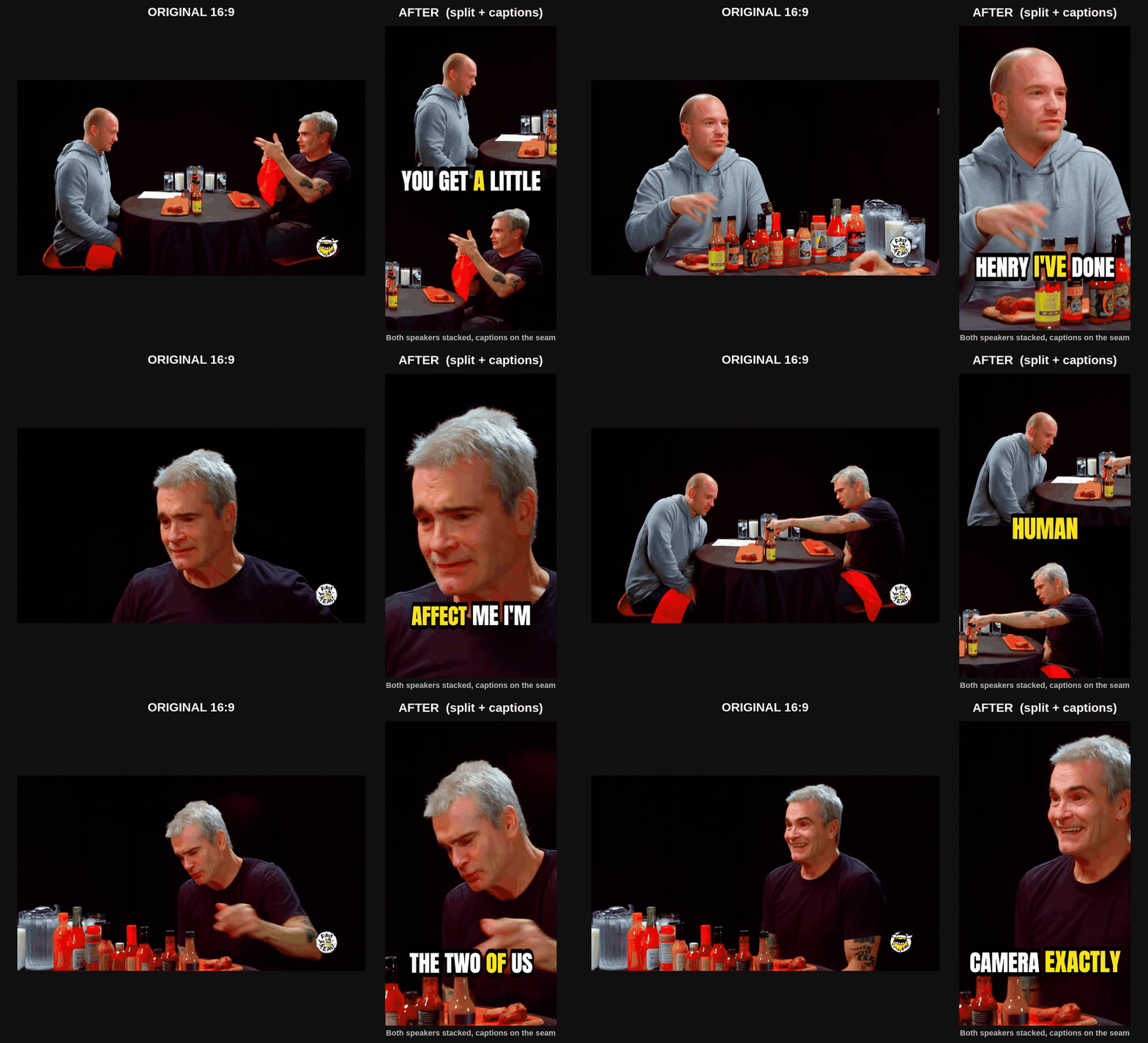
You run it on your own machine, bring your own API keys, and keep your source video on your infrastructure. No hosted service, no billing, no usage cap.
Fork
Clipwright is a fork of OpenShorts, renamed and trimmed to a self-hosted tool: the cloud/billing mode, AI Shorts/UGC, MCP/agent layer and Upload-Post publishing were removed, YouTube Studio was fixed, and publishing now goes through Postiz. Upstream copyright is preserved in LICENSE and NOTICE.
Requirements
- Docker & Docker Compose
- Google Gemini API key — free tier — used for moment detection, layouts, titles and thumbnails. Optional if you set
LLM_BASE_URL. - A self-hosted Postiz instance — optional, only for publishing.
Quick start
git clone https://git.pbento.pt/pedro-bento/clipwright.git
cd clipwright
cp .env.example .env          # optional: Postiz server-side key
docker compose up --build
Open the dashboard at http://localhost:5175, go to Settings, and paste your keys (Gemini; Postiz is optional). Then:
- Clip Generator — upload a long video or paste a URL.
- YouTube Studio — generate titles, thumbnails and descriptions.
- Publish a finished clip to your connected Postiz channels.
Configuration
Server-side (.env):
| Variable | Purpose |
|---|---|
GEMINI_API_KEY |
Gemini key used server-side (self-host). The dashboard can also send one per request. |
LLM_BASE_URL / LLM_MODEL / LLM_API_KEY |
Point the moment picker at any OpenAI-compatible server (Ollama, vLLM, LM Studio…) to run without a Google key. |
POSTIZ_URL / POSTIZ_API_KEY |
Your Postiz instance + API key, used when the dashboard does not send them. |
MAX_CONCURRENT_JOBS |
Concurrent jobs (default 5). |
MAX_FILE_SIZE_MB |
Upload cap in MB; 0 (default) is unlimited. |
Client-side (stored encrypted in your browser): GEMINI_API_KEY, postiz_url, postiz_key_v1.
Run without a Google key (optional)
# .env
LLM_BASE_URL=http://host.docker.internal:11434/v1   # Ollama on the host
LLM_MODEL=qwen2.5:14b
Works with Ollama, LM Studio, vLLM, llama.cpp, LocalAI and OpenRouter. Use OLLAMA_CONTEXT_LENGTH=16384 or higher. The moment picker then runs locally; frame-based stages (layout picker, silent videos) still use Gemini if a key is present.
GPU acceleration (optional, NVIDIA)
The default image is CPU-only. With an NVIDIA card an 8-minute video clips in about a minute instead of 5–8. Install the NVIDIA Container Toolkit, then create docker-compose.override.yml:
services:
  backend:
    build:
      context: .
      args:
        GPU: "1"
    deploy:
      resources:
        reservations:
          devices:
            - driver: nvidia
              count: all
              capabilities: [gpu, video]
Publishing with Postiz
- Run Postiz yourself and connect TikTok, Instagram and/or YouTube inside it.
- Create a public API key in Postiz (Settings → Developers / Public API).
- In Clipwright Settings, enter your Postiz URL and key, then Test connection to list your channels.
- In the publish modal, tick the exact channel each clip should go to. Multiple channels per network are supported (for example two YouTube channels), so you pick the channel itself, not the platform, and schedule it with a DD/MM/YYYY date.
Clipwright uploads the clip to your Postiz instance and creates the post there; the platform tokens never leave your infrastructure.
API and webhooks
curl -X POST http://localhost:8000/api/process \
  -H "Content-Type: application/json" \
  -d '{"url": "https://youtube.com/watch?v=...", "acknowledged": true,
       "webhook_url": "https://your-server.com/hooks/clipwright"}'
Add webhook_url for exactly one callback when the job ends; with webhook_secret the body is signed X-Clipwright-Signature: sha256=…. Interactive docs are at /docs.
Project structure
clipwright/            # Python backend package
  core/                #   shared helpers (security, filesystem paths)
  api/                 #   FastAPI app, auth, free tools
  pipeline/            #   download → transcribe → clip orchestration, Gemini, quality probe
  layouts/             #   reframing: active speaker, split/screencast/panel, punch-in
  media/               #   FFmpeg helpers, subtitles, hooks, thumbnails, recut
  integrations/        #   Postiz, YouTube, file hosts
  tools/               #   local verification scripts (python -m clipwright.tools.verify_hooks)
dashboard/             # React + Vite dashboard (its own build)
remotion/              # Remotion compositions used by the renderer
render-service/        # Node render microservice (its own Dockerfile)
cli/                   # published `clipwright` HTTP client (own pyproject)
tests/                 # pytest suite (pythonpath = ["."])
fonts/  assets/        # shared runtime resources (kept at repo root)
The backend runs from the source tree (no install step): uvicorn clipwright.api.app:app serves the API and clip jobs run as python -m clipwright.pipeline.main.
Tech stack
Python 3.11 · FastAPI · google-genai · faster-whisper · ultralytics (YOLOv8) · MediaPipe · FFmpeg · React 18 · Vite · Tailwind · Docker Compose.
License
MIT. Forked from OpenShorts; upstream copyright preserved in LICENSE and NOTICE.