 pedro-bento
edcfeaf9d5 - Delete the entire cloud/ package (Stripe billing, auth/OAuth, metering, API keys,
account erasure, lifecycle/digest emails, R2 archive, autopilot, MCP OAuth,
proxy ledger, managed keys) and all BILLING_ENABLED branches in app.py
- Keep self-host behavior via no-op shims; /api/config now returns
{youtubeUrlEnabled, jobRetentionSeconds, localLlm}
- Remove cloud tests (31 files), alembic/, log_view.py, requirements-billing.txt,
docker-compose.cloud.yml; update CLI to Postiz + /api/config; clean docs/skills
- Flatten dashboard: remove auth/billing/pricing/history chrome, inert config-only AuthContext
- Fix residual test drift; lint + build + compile all green
|
||
|---|---|---|
| .github/workflows | ||
| .hallmark | ||
| assets | ||
| cli | ||
| dashboard | ||
| docs | ||
| examples/n8n | ||
| fonts | ||
| ops | ||
| remotion | ||
| render-service | ||
| screenshots | ||
| skills/openshorts | ||
| tests | ||
| .dockerignore | ||
| .env.example | ||
| .gitignore | ||
| active_speaker.py | ||
| app.py | ||
| camera_inset.py | ||
| churchil_queen_vertical.gif | ||
| churchil_queen_vertical_short.gif | ||
| CLAUDE.md | ||
| clip_selection.py | ||
| demo-openshorts.mp4 | ||
| design.md | ||
| docker-compose.e2e.local.yml | ||
| docker-compose.yml | ||
| Dockerfile | ||
| edit_builder.py | ||
| editor.py | ||
| ffmpeg_utils.py | ||
| file_hosts.py | ||
| frame_sampler.py | ||
| free_tools.py | ||
| gemini_worker.py | ||
| glama.json | ||
| hook_grounding.py | ||
| hooks.py | ||
| layout_picker.py | ||
| layout_ranges.py | ||
| LICENSE | ||
| llm_backend.py | ||
| main.py | ||
| media_auth.py | ||
| NOTICE | ||
| panel_layout.py | ||
| postiz.py | ||
| punch_in.py | ||
| quality_probe.py | ||
| README.md | ||
| recut.py | ||
| reframe_v2.py | ||
| requirements.txt | ||
| restoring_static.py | ||
| s3_uploader.py | ||
| scene_detection.py | ||
| screencast_layout.py | ||
| security_utils.py | ||
| server.json | ||
| split_layout.py | ||
| subtitles.py | ||
| thumbnail.py | ||
| transcribe_backends.py | ||
| translate.py | ||
| verify_aesthetic.py | ||
| verify_custom_hook.py | ||
| verify_hooks.py | ||
| watermarked.py | ||
| yt_clients.py | ||
OpenShorts








Self-hosted AI video platform with 2 tools in one: Clip Generator and YouTube Studio, publishing through a self-hosted Postiz instance.
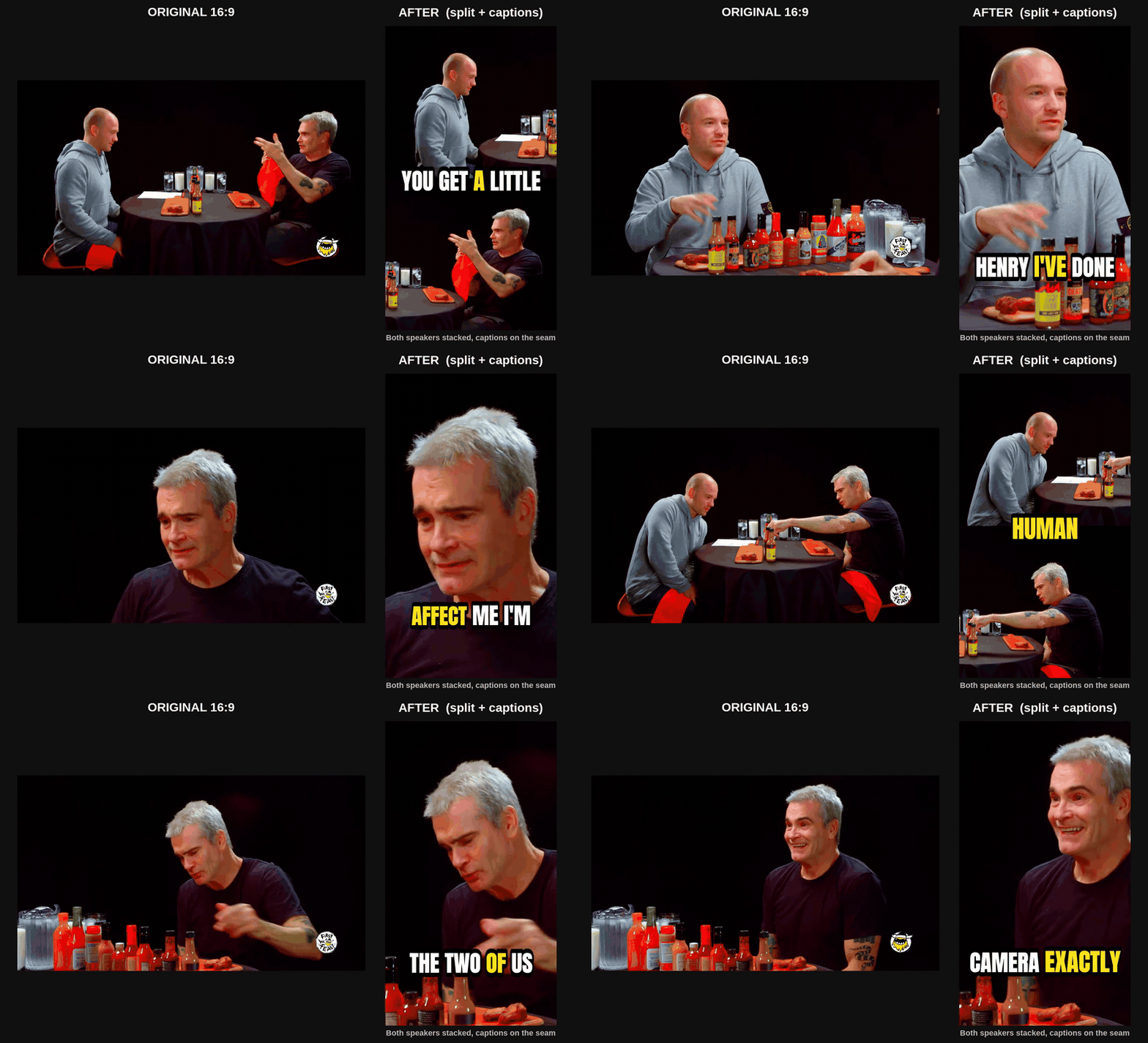
Two people on camera? OpenShorts stacks them instead of shrinking the wide shot, puts the captions on the seam where they cover nobody, and switches back to a face-tracked crop when the cut goes to one person. The AI picks the layout per video; nothing to configure.
This is a clean, self-hosted fork. You run it on your own machine with Docker and bring your own Gemini and ElevenLabs keys. There is no hosted service, no billing, and no usage cap. Publishing to TikTok, Instagram Reels and YouTube Shorts goes through your own Postiz instance.
2 Tools in 1 Platform
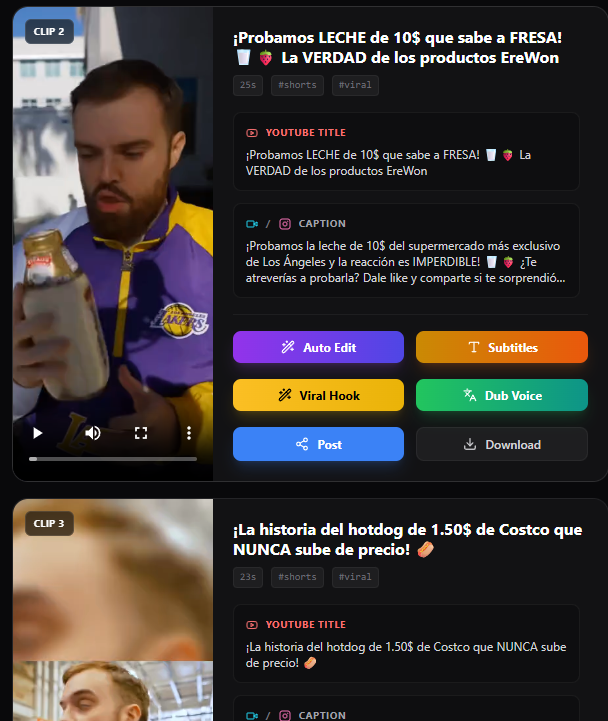
1. Clip Generator
Turn your long-form videos — podcasts, webinars, livestreams, vlogs, interviews — into viral-ready 9:16 shorts for TikTok, Instagram Reels, and YouTube Shorts.
2. YouTube Studio
Free AI YouTube toolkit: thumbnails, titles and descriptions.
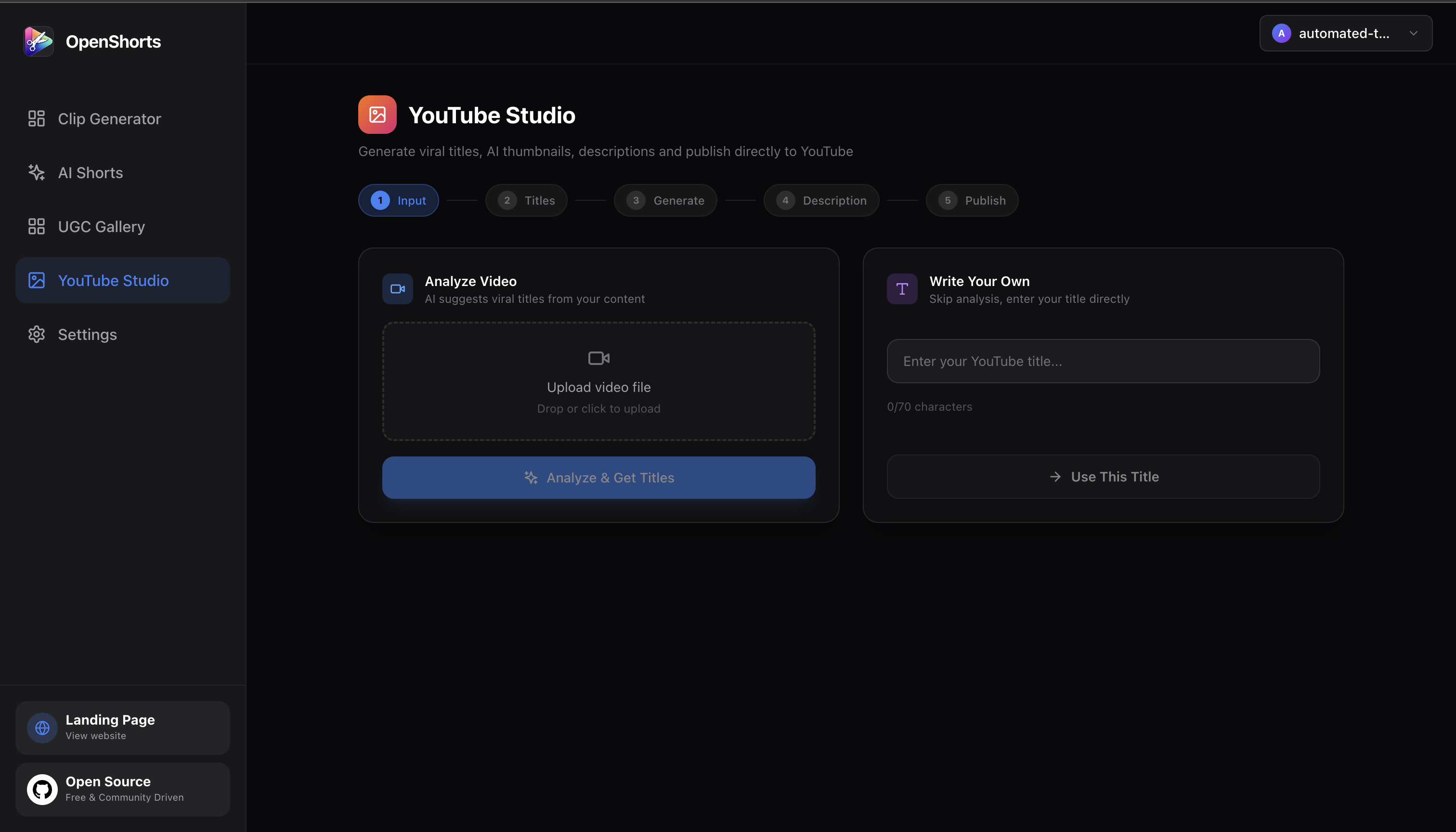
- AI thumbnail generator with face overlay
- 10 viral title suggestions with refinement chat
- Auto-generated descriptions with chapter timestamps
Key Features
Clip Generator
- Viral Moment Detection: Google Gemini 3.1 Flash-Lite analyzes transcripts and scene boundaries to detect 3-15 high-potential moments
- Runs fully local if you want: point
LLM_BASE_URLat Ollama, LM Studio, vLLM or any OpenAI-compatible server and the moment picker runs on your own model, no Google key needed (see Run without a Google key) - Smart 9:16 Cropping: AI reframing per scene — TRACK mode (MediaPipe + YOLOv8 face tracking), GENERAL mode (blurred background), SPLIT mode (two speakers stacked, captions on the seam) and SCREENCAST mode (screen over presenter); the layout is picked per video by Gemini or forced from the dashboard
- Auto Subtitles: faster-whisper with word-level timestamps, styled and burned into clips
- AI Voice Dubbing: ElevenLabs integration for 30+ languages
- Hook Text Overlays: AI-generated attention-grabbing text overlays
- AI Video Effects: Gemini-generated FFmpeg filters for professional effects
YouTube Studio
- AI-powered title generation with 10 viral options
- Interactive refinement chat for titles
- AI thumbnail generation with custom face + background
- Auto descriptions with chapter timestamps from the Whisper transcript
Postiz Publishing
- One-click posting to TikTok, Instagram Reels, and YouTube Shorts through your self-hosted Postiz instance
- Schedule uploads for any date and time — plan your content calendar and let Postiz publish
- You own the credentials: Postiz runs on your infrastructure and holds the platform tokens, so OpenShorts never has them
Infrastructure
- S3 cloud backup (optional; private bucket for clips)
- Async job queue with configurable concurrency
Who Is This For?
- Content creators — Turn long videos into shorts automatically, publish to all platforms at once
- Podcasters & educators — Extract the most engaging moments from episodes and lessons
- Developers — Self-host, customize the pipeline, integrate via API
- Privacy-conscious teams — The source video stays on your infrastructure
How Much Does It Cost?
Self-hosting OpenShorts is free. You provide the machine and you only pay for the AI APIs you use, and most have generous free tiers:
| Service | Free Tier | Paid Cost | Used For |
|---|---|---|---|
| Google Gemini | Free trial with generous limits | < $0.01 per 10-min video | Viral moment detection, titles, thumbnails, descriptions |
| Local LLM (Ollama, LM Studio, vLLM...) | Free, your hardware | $0 | Viral moment detection instead of Gemini (LLM_BASE_URL) |
| ElevenLabs | Free tier available | Pay-per-use | Voice dubbing |
| Postiz | Open source, self-hosted | $0 (your hardware) | Publishing to TikTok, Instagram, YouTube |
| AWS S3 | Optional | ~$0.023/GB | Backup for clips |
Bottom line: you can clip and publish videos for practically free with a Gemini free-tier key and a self-hosted Postiz.
Requirements
- Docker & Docker Compose
- Google Gemini API Key (Free — get it here) — required for all AI features unless
LLM_BASE_URLis set - ElevenLabs API Key (Free tier) — optional, for voice dubbing
- Self-hosted Postiz (Postiz docs) — optional, for social publishing
Getting Started
1. Clone
git clone https://github.com/mutonby/openshorts.git
cd openshorts
2. Configure (optional)
cp .env.example .env
# Edit .env with your AWS keys for S3 backup and your Postiz URL/key
3. Launch
docker compose up --build
4. Open Dashboard
Navigate to http://localhost:5175
- Go to Settings and enter your API keys (Gemini, ElevenLabs) and your Postiz URL + API key
- Clip Generator: Upload a long-form video to generate viral shorts
- YouTube Studio: Generate thumbnails, titles, and descriptions for YouTube
5. GPU acceleration (optional, NVIDIA)
The default image is CPU-only. With an NVIDIA card (any card with NVENC, e.g. RTX 4060) an 8-minute video clips in about a minute instead of 5 to 8. Nothing is passed through in the VM sense — the container just gets access to the host GPU.
Host: install the NVIDIA driver (nvidia-smi must work) and the NVIDIA Container Toolkit:
sudo nvidia-ctk runtime configure --runtime=docker && sudo systemctl restart docker
docker run --rm --gpus all nvidia/cuda:12.4.0-base-ubuntu22.04 nvidia-smi   # sanity check
On Windows use Docker Desktop with the WSL2 backend and the Windows NVIDIA driver; no driver inside WSL.
Compose: create docker-compose.override.yml next to docker-compose.yml (picked up automatically). GPU: "1" adds cuBLAS/cuDNN and onnxruntime-gpu to the image (~2 GB); video is required for NVENC.
services:
  backend:
    build:
      context: .
      args:
        GPU: "1"
    deploy:
      resources:
        reservations:
          devices:
            - driver: nvidia
              count: all
              capabilities: [gpu, video]
.env:
WHISPER_MODEL=large-v3-turbo
WHISPER_DEVICE=cuda
WHISPER_COMPUTE=float16
FFMPEG_ENCODER=auto           # probes h264_nvenc at startup, falls back to x264
TRANSCRIBE_BACKEND=parakeet   # optional: ~2x faster than whisper, 25 European languages, auto-falls back to whisper
ASR_GPU_CONCURRENCY=1
Verify:
docker compose up --build -d
docker exec openshorts-backend nvidia-smi -L
docker exec openshorts-backend ffmpeg -hide_banner -f lavfi -i testsrc=size=256x256:rate=1 -frames:v 1 -c:v h264_nvenc -f null -
The backend log on the first job reports the chosen encoder and transcription device. A CUDA error in whisper (e.g. VRAM exhausted) retries once on CPU automatically. 8 GB of VRAM is enough for large-v3-turbo fp16 plus the detection models.
6. Run without a Google key (local LLM, optional)
The only cloud call in the clip pipeline is the moment picker: it sends the transcript (never the video) to Gemini. Point it at any OpenAI-compatible server instead and the whole pipeline stays on your box:
# .env
LLM_BASE_URL=http://host.docker.internal:11434/v1   # Ollama on the host
LLM_MODEL=qwen2.5:14b                                # any chat model that follows instructions
# LLM_API_KEY=...                                    # only if your server checks one (vLLM --api-key, OpenRouter)
Works with Ollama, LM Studio, vLLM, llama.cpp server, LocalAI and OpenRouter. The dashboard stops asking for a Gemini key when this is set. Two things to know:
- Context length. A scoring call carries three transcript windows
(~2-3k tokens) and the detail call up to ten (~5k on a long podcast).
Ollama defaults to a 4096-token context and truncates silently, so run it
with
OLLAMA_CONTEXT_LENGTH=16384(or setnum_ctxin a Modelfile); raiseLLM_SCORE_BATCHabove 3 only if your context allows it. 7-8B models return valid JSON reliably, 3B ones do not. - What still needs Gemini. Anything that has to look at frames: the
automatic layout picker (
AUTO_LAYOUT), the on-screen content detector and silent videos (no speech to clip by). Without a Gemini key those fall back to the plain face-tracking crop, and a silent video fails with a message that says so. Add a key alongsideLLM_BASE_URLand you get both.
Technical Pipeline
Clip Generator
- Ingest — Local video upload (or self-hosted URL ingest via yt-dlp)
- Transcribe — faster-whisper with word-level timestamps
- Detect — PySceneDetect for scene boundaries
- Analyze — Gemini identifies 3-15 viral moments (15-60s each)
- Extract — FFmpeg precise clip cutting
- Reframe — AI vertical cropping with subject tracking
- Effects — Subtitles, hooks, AI video effects
- Publish — S3 backup + publishing through Postiz
YouTube Studio
- Titles — Gemini generates 10 options with an interactive refinement chat
- Thumbnails — AI image generation with an optional uploaded face and background
- Descriptions — auto-written from the Whisper transcript with chapter timestamps
Automate It: REST API and Webhooks
You don't need the dashboard. The pipeline is callable by scripts and workflows.
REST API
curl -X POST http://localhost:8000/api/process \
  -H "Content-Type: application/json" \
  -d '{"url": "https://youtube.com/watch?v=...", "acknowledged": true,
       "webhook_url": "https://your-server.com/hooks/openshorts"}'
Interactive docs at /docs (OpenAPI) on any instance.
Completion webhooks
Pass webhook_url (and optionally webhook_secret) to POST /api/process and you get exactly one POST when the job reaches a terminal state — no polling loops in your n8n / cron pipelines:
{"event": "job.completed", "job_id": "…",
 "clips": [{"index": 0, "title": "…", "video_url": "…", "download_url": "…"}]}
With a secret, the body is signed: X-OpenShorts-Signature: sha256=<hmac-sha256(body)>.
n8n
An importable workflow (video URL in, clips out, no polling) lives in
examples/n8n/. Publishing in the workflow goes through your
Postiz instance.
Tech Stack
| Layer | Technology |
|---|---|
| Backend | Python 3.11, FastAPI, google-genai, faster-whisper, ultralytics (YOLOv8), mediapipe, opencv-python, yt-dlp, FFmpeg, httpx |
| Frontend | React 18, Vite 4, Tailwind CSS 3.4 |
| AI APIs | Google Gemini, ElevenLabs |
| Infrastructure | Docker + Docker Compose, AWS S3 (optional) |
| Publishing | Self-hosted Postiz (TikTok, Instagram, YouTube) |
Environment Variables
Server-side (.env):
| Variable | Description |
|---|---|
AWS_ACCESS_KEY_ID |
AWS access key for S3 (optional) |
AWS_SECRET_ACCESS_KEY |
AWS secret key (optional) |
AWS_REGION |
AWS region (default: us-east-1) |
AWS_S3_BUCKET |
Private bucket for clip backup (optional) |
MAX_CONCURRENT_JOBS |
Concurrent processing limit (default: 5) |
MAX_FILE_SIZE_MB |
Upload size cap in MB. 0 (default) is unlimited |
LLM_BASE_URL |
OpenAI-compatible server for the moment picker (Ollama, vLLM, LM Studio...). Set it and the Gemini key becomes optional |
LLM_MODEL |
Model name on that server (default llama3.1:8b) |
LLM_API_KEY |
Bearer token for that server, if it checks one |
LLM_SCORE_BATCH |
Transcript windows per scoring call (default 3 local, 8 Gemini) |
POSTIZ_URL |
Base URL of your self-hosted Postiz instance |
POSTIZ_API_KEY |
Postiz API key used server-side when the dashboard does not send one |
Client-side (encrypted in localStorage):
| Key | Description |
|---|---|
GEMINI_API_KEY |
Google Gemini — required unless LLM_BASE_URL is set (then only for layout picking and silent videos) |
ELEVENLABS_API_KEY |
ElevenLabs — optional, for voice dubbing |
postiz_url |
Base URL of your self-hosted Postiz instance |
postiz_key_v1 |
Postiz API key, sent to the backend as X-Postiz-Key |
Security & Performance
- Non-Root Execution: Containers run as dedicated
appuser - Concurrency Control: Semaphore-based job queue (
MAX_CONCURRENT_JOBS) - Auto-Cleanup: Automatic purging of old jobs (1h retention)
- Encrypted Keys: API keys encrypted client-side, never stored server-side
- Upload Validation: Image uploads validated for format and minimum size
- Configurable File Limits:
MAX_FILE_SIZE_MB(0 = unlimited)
Social Publishing Setup (Postiz)
- Deploy Postiz: run your own instance with Docker (see the Postiz docs)
- Connect accounts: link TikTok, Instagram and/or YouTube inside Postiz
- Create an API key: in Postiz settings, generate a public API key
- Use in OpenShorts: paste the Postiz URL and key in Settings, then use "Test connection" to list the connected channels
Star History
Contributions
Contributions are welcome! Whether it's improving the crop and subtitle pipeline or the dashboard — feel free to open a PR.
License
MIT License — OpenShorts is yours to use, modify, and scale.